
 By Mehak Ishfaq
Searching for a home in Dubai without a proper portal usually means chasing outdated listings or duplicate ads across a dozen different pages. Property Finder has become the default starting point for most buyers and renters in the city, but knowing how to use it well makes a real difference in how fast you find the right place. This guide walks through setting up your search, comparing areas, and avoiding the most common mistakes people make when using the platform in 2026.
What Property Finder Dubai Actually Offers
Property Finder is the largest property portal operating in the UAE, listing everything from studio apartments to branded villas across every emirate. Every listing on the platform is meant to be tied to an active broker or landlord, and listings marked as verified have had their details cross checked against Dubai Land Department records, which reduces the chance of encountering a fake or duplicate ad. The platform also publishes area level market data, including average asking rents and recent transaction trends, which is useful context before you commit to a neighborhood. You can browse current listings directly on Property Finder’s official site.
Comparing Rent by Area Before You Search
One of the most useful things you can do before opening any filters is get a rough sense of what different areas actually cost. The chart below compares typical one bedroom rent ranges across some of the most searched communities on the platform.
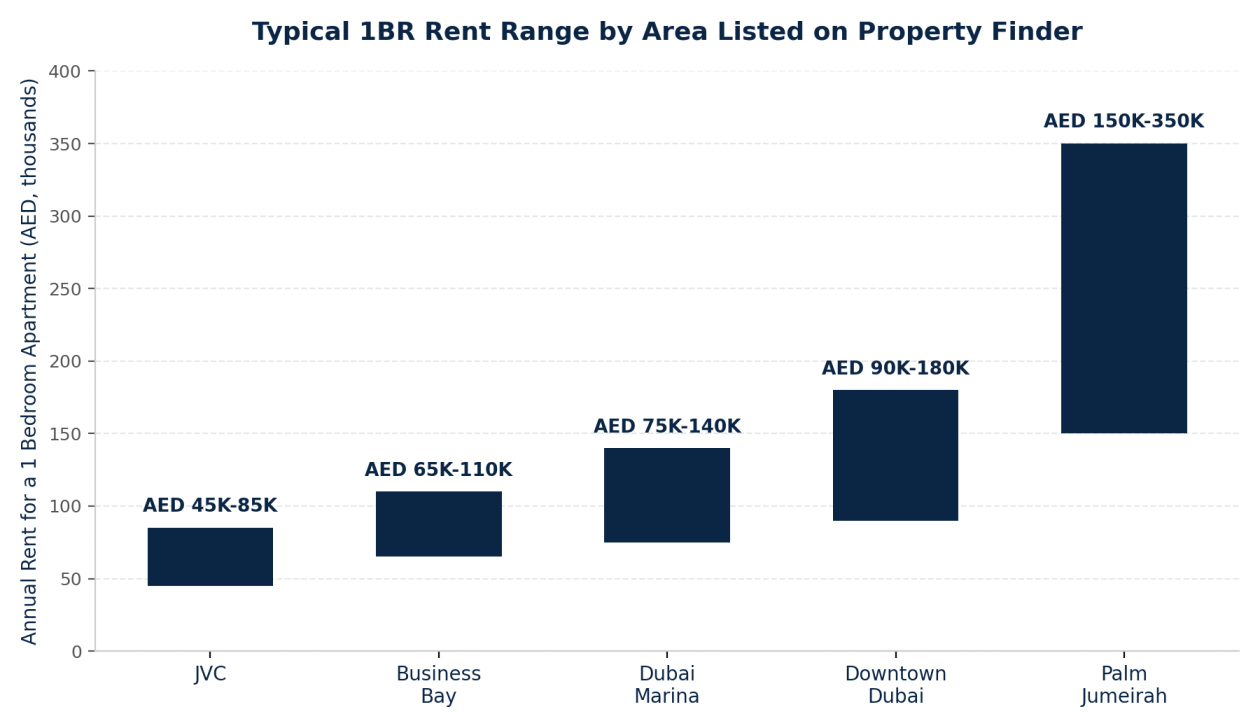
As the chart shows, JVC remains the most budget friendly option among these communities, while Palm Jumeirah sits well above the rest due to its waterfront positioning. Knowing this range before you search helps you set realistic filters instead of scrolling through listings outside your actual budget.
How to Use Property Finder for Buying
Step 1: Set your filters properly
Start with location, budget, and property type, then narrow further by bedroom count and completion status if you specifically want ready or off plan units. Being too broad early on tends to produce an overwhelming number of results.
Step 2: Prioritize verified listings
Listings carrying the verified badge have had their details checked, which meaningfully reduces the odds of contacting an agent about a unit that is already sold or was never actually available.
Step 3: Use the market data tab
Most area pages include a data section showing recent transaction prices for comparable units nearby. Cross check any listing’s asking price against this before scheduling a viewing, since asking prices and actual closed transaction prices can differ significantly in a fast moving market.
Step 4: Contact the agent directly through the platform
Reaching out through Property Finder’s messaging system keeps a record of your conversation, which can be useful if details discussed with an agent later differ from what was agreed.
Step 5: Verify before signing anything
Before signing a Memorandum of Understanding or paying a deposit, confirm the property’s title deed status and the agent’s RERA registration independently through the Dubai Land Department, rather than relying solely on the platform’s verified badge.
How to Use Property Finder for Renting
Step 1: Define your non negotiables
Commute time, pet policies, and parking availability tend to matter more day to day than a slightly larger living room, so filter for these early rather than adjusting for them later.
Step 2: Factor in the full annual cost
Rent listed on the platform typically excludes DEWA connection charges, cooling fees in some buildings, and the standard five percent Ejari registration fee, so budget for these separately when comparing listings.
Step 3: Schedule viewings for your shortlist
Photos on any listing site can be flattering, so viewing in person before committing remains the only reliable way to judge natural light, noise levels, and building maintenance quality.
Step 4: Review the tenancy contract carefully
Confirm the number of cheques required, the notice period for renewal or termination, and who is responsible for maintenance requests before signing, since these terms vary meaningfully between landlords.
Step 5: Register the contract through Ejari
A signed tenancy contract only becomes legally recognized once registered through Ejari, which is also required for setting up your DEWA account and, in most cases, applying for a UAE residence visa tied to your rental address.
Tips for Getting More Out of the Platform
Set up saved search alerts rather than manually checking back, since new listings matching your criteria are added throughout the day and popular units can be gone within hours in high demand areas. Cross reference an agent’s profile and review history before committing to a viewing, since response quality varies considerably between agents even within the same agency. If you are comparing specific communities before narrowing your search, our guide to the best places to live in the UAE for expats breaks down pricing and lifestyle differences across the areas most searched on the platform.
Where a Portal Cannot Replace a Broker
Property Finder is excellent for browsing and comparing, but it is not a substitute for representation during negotiation. A licensed broker can access off market listings, negotiate directly on price or payment terms, and flag issues with a specific building’s service charges or history that rarely show up in a standard listing. Our guide to real estate commission rates in Dubai explains what a properly licensed agent should be charging, so you know what is reasonable before agreeing to work with one.
Final Thoughts
Property Finder remains the most efficient starting point for anyone searching for property in Dubai, provided you use its verification tools and market data properly rather than just browsing photos. Setting realistic filters based on actual area pricing, sticking to verified listings, and independently confirming details through the Dubai Land Department before signing anything will save you far more time than scrolling endlessly through unfiltered results.
Frequently Asked Questions
Is Property Finder Dubai free to use for buyers and renters?
Yes, browsing and contacting agents through Property Finder is free for anyone searching for property, since the platform earns revenue from agents and developers who list on it.
How do I know if a listing on Property Finder is verified?
Verified listings display a badge confirming the details have been cross checked against Dubai Land Department records, which appears directly on the listing itself.
What additional costs should I budget for beyond the rent shown on a listing?
Budget separately for the Ejari registration fee, DEWA connection charges, and any agency commission, since these are typically not included in the advertised rent figure.
Can I negotiate the price on a Property Finder listing?
Yes, asking prices on the platform are generally negotiable, particularly for units that have been listed for an extended period, and a licensed broker can often negotiate more effectively on your behalf.
Do I still need a broker if I find a property through Property Finder myself?
Not necessarily for straightforward rentals, but a broker becomes more valuable for purchases, off market opportunities, or negotiations involving payment plans and post handover terms.
How current is the market data shown on Property Finder’s area pages?
The platform updates its area data using recent Dubai Land Department transaction records, though it is still worth cross checking against a recent, comparable sale before finalizing an offer.